At a glance
A practical guide to choosing backup power for outages, essential circuits, refrigerators, Wi-Fi, medical devices, sump pumps, work-from-home gear and longer storm preparation.
Home backup is not one single product category. A small portable power station can protect a router and laptop. A 2kWh to 3kWh system can keep the essentials alive through shorter outages. A larger expandable solar generator with transfer switch support can protect selected home circuits. The right choice depends on what you need to keep running, how long outages last where you live and whether you need 120V only or 240V support.
Compare home backup systems Learn about solar generators
First decision Essential backup or whole-home backup
Capacity range 1kWh to 60kWh+
Output range 1500W to 7200W+
Voltage question 120V or 120V/240V
Connection path Direct plug or transfer switch
Best use Outages, storms, essential circuits
Home backup is a smart fit if you want quiet, indoor-safe emergency power
A battery power station or solar generator makes sense when your main goal is to keep essentials running without fuel storage, engine noise or generator exhaust. It is especially useful for refrigerators, Wi-Fi, lights, laptops, phone charging, selected circuits when used with the right transfer switch setup.
Do not buy by headline capacity alone
Many buyers compare only watt-hours and miss the harder questions: starting surge, 120V vs 240V, transfer switch compatibility, solar input, recharge time, weight and whether the system can run the exact loads they care about. A big battery with the wrong output or connection method can still be the wrong backup system.
A worked 12-hour example
Suppose your refrigerator averages 50W across its on/off cycles, your modem and router draw 20W together, and lights use 20W for four hours. The energy budget is (50 × 12) + (20 × 12) + (20 × 4) = 920Wh. At an assumed 85% delivery efficiency and 20% reserve, nominal capacity is 920 ÷ 0.85 ÷ 0.80 = approximately 1,353Wh.
These are illustrative loads, not appliance ratings. Check compressor startup separately. A plug-in energy meter provides a better refrigerator estimate than treating the label wattage as a constant load.
Common backup needs
Home backup planning starts with a few practical problems: which devices matter, how long they need power, and how they will connect to the backup source.
Power outage backup
Keeping core devices alive during a blackout, storm, wildfire shutoff or grid failure.
Refrigerator backup
Protecting food, freezer contents and basic kitchen needs during short to medium outages.
Essential circuits
Using a transfer switch to power selected circuits instead of running extension cords everywhere.
Solar recharge
Adding panels so the battery can recover during multi-day outages when sunlight is available.
Start by deciding what the system must protect
The biggest mistake is asking, “What size solar generator do I need for my house?” The better question is, “Which loads must stay on, and for how many hours?” Whole-home backup and essential-load backup are completely different buying decisions.
Level 1: device backup
Best for routers, phones, laptops, lights, tablets, small fans and one critical device. This is where a 1kWh class system can be useful.
Level 2: essential appliance backup
Best for refrigerators, freezers, Wi-Fi, fans, lights and work gear. This is where 2kWh to 3.6kWh systems become more realistic.
Level 3: essential circuit backup
Best for selected circuits through a manual or smart transfer switch. This is where output, surge, voltage and electrician-installed hardware matter.
Buy for the outage you actually expect
For short outages, a compact 1kWh to 2kWh backup kit can be enough. For overnight outages, most homes feel safer with 2kWh to 3.6kWh. For multi-day storm backup, expandable systems with solar input and transfer switch support become much more useful.
Short outageRouter, lights, phones, laptop
Overnight outageFridge, fan, Wi-Fi
Storm outageSolar recharge and load rotation
Home circuitsTransfer switch required
How to choose the right home backup power station
There are four numbers that matter more than almost anything else: watt-hours, continuous output, surge output and voltage. Ignore one of them and the system may not run the appliance you bought it for.
| Spec | What it means | Why it matters at home |
|---|---|---|
| Watt-hours | Stored energy | Helps estimate runtime for a fridge, router, lights or work setup. |
| Continuous watts | Steady output | Determines what the power station can run without overload. |
| Surge watts | Short starting power | Important for refrigerators, pumps, compressors, motors and some tools. |
| 120V vs 240V | Voltage support | Most small appliances use 120V. Large home appliances may require 240V. |
| Solar input | Recharge potential | Useful when outages last longer than the battery alone. |
| Transfer switch support | Home circuit connection | Lets selected circuits run from backup without unsafe backfeeding. |
Which type of home backup system fits your situation?
Use this as a buyer map before choosing a specific Jackery product or any other solar generator. The best option is usually the smallest system that reliably covers your critical loads with a comfortable buffer.
Compact backup kit
For apartments, home offices, routers, laptops, phone charging and one small essential appliance.
Expandable power station
For homeowners who want more runtime now and the option to add battery capacity later.
Solar generator bundle
For outages where daytime recharge matters and you want a battery plus panel setup from the start.
Transfer switch system
For essential circuits, cleaner installation and less dependence on extension cords during outages.
Where the main Jackery home backup products fit
This is not a ranking by size. It is a practical map of use cases. A smaller system can be the right choice for a router and fridge rotation. A larger system is only worth it when you actually need the output, expansion, voltage support or circuit integration.
| Product path | Best fit | Why it belongs on the home backup list |
|---|---|---|
| Solar Generator HomePower 1000 v2 | Compact essential backup | Useful for small outage kits, UPS-style protection, router backup, laptops, lights and light appliance support. |
| HomePower 2000 Plus v2 | Small expandable backup | A stronger 2kWh class option for users who want more runtime and the option to expand capacity. |
| HomePower 3000 | Practical 3kWh backup | A sensible essential-load system for homeowners focused on refrigerators, Wi-Fi, lights and outage basics. |
| HomePower 3600 Plus | Large essential backup | Better for heavier 120V loads, longer runtime and owners who may expand later. |
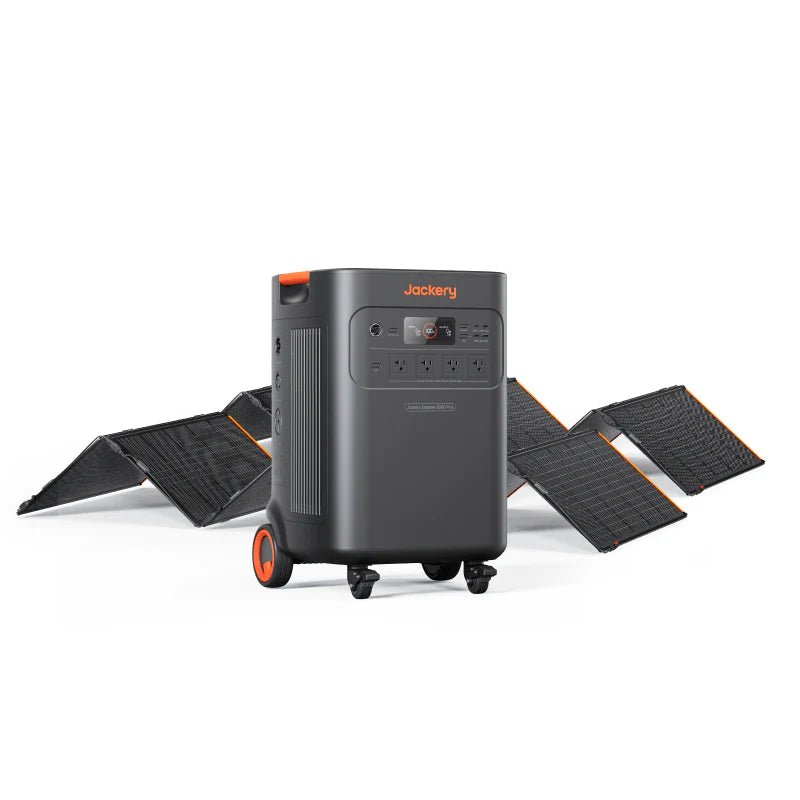
| Explorer 5000 Plus | Serious home backup | Moves into higher-output home backup territory, including 120V/240V needs when configured correctly. |
| Solar Generator 5000 Plus | Solar-ready larger backup | Best when the buyer wants a bigger backup system with solar panels and home-circuit planning. |
Next steps
What can a home backup power station run?
Runtime depends on the actual watt draw, battery size, inverter efficiency and how often appliances cycle on and off. The safest way to plan is to list your essential loads, check their wattage and separate must-run devices from nice-to-have devices.
Easy essential loads
Wi-Fi router, modem, LED lights, phones, tablets, laptops, small fans, radios and compatible low-power devices.
Moderate loads
Refrigerators, freezers, TVs, desktop computers, small kitchen appliances and some pumps.
Harder loads
Sump pumps, well pumps, microwave ovens, space heaters, large AC units, water heaters and 240V appliances.
Do not ignore voltage when planning home backup
A 120V backup system can be excellent for everyday essential loads. But some home appliances and circuits may need 240V. If you want to back up central air conditioning, certain well pumps, electric dryers, electric ranges, large water heaters or other high-draw appliances, voltage support and installation design become critical.
120V backup is enough when
You mainly care about a fridge, freezer, router, lights, phone charging, laptop, fans, TV and small appliances. Many portable power stations are strongest in this role.
Look at 240V systems when
You want to support larger home loads, split-phase circuits or appliances that cannot run from a standard 120V outlet. This is where larger systems, double-kit setups and professional installation become more important.
Do solar panels work during a power outage?
Rooftop solar by itself usually does not mean your house has backup power when the grid is down. Many grid-tied systems shut down during outages for safety. To use solar during an outage, you normally need a compatible battery, inverter and backup configuration. Portable solar generator setups solve this differently by charging a battery directly from compatible solar panels.
Solar panels only
May not power your home during an outage if the system is grid-tied without backup capability.
Solar plus battery
Stores energy for later use and can improve resilience when the grid is down.
Portable solar generator
Uses panels to recharge a power station, which can run selected devices or circuits depending on the model.
When you need a transfer switch for home backup
If you only want to plug a refrigerator, router or lamp directly into the power station, you may not need a transfer switch. But if you want to power built-in home circuits, you need the right transfer switch or backup panel solution installed correctly.
| Setup | How it works | Best for |
|---|---|---|
| Direct plug-in | Appliances plug into the power station outlets. | Fridge, router, lights, laptop, small devices. |
| Extension cord plan | Heavy-duty cords move power to selected devices. | Temporary emergency use with careful load management. |
| Manual transfer switch | Selected circuits are switched from grid to backup source. | Cleaner essential-circuit backup without unsafe backfeeding. |
| Smart transfer switch | More advanced circuit control, monitoring and automation. | Higher-end systems and larger backup planning. |
Battery backup avoids fuel exhaust, but home wiring still matters
Portable battery systems can be used indoors because they do not produce engine exhaust. Gas generators are different and must be used outdoors, away from windows, doors and vents. For circuit-level backup, use proper transfer equipment and a qualified electrician. Never improvise a home wiring connection.
CO safetyFuel generators stay outside
No backfeedingUse proper transfer equipment
Load limitsRespect output and surge ratings
Battery reserveKeep charge for critical loads
Solar generator or gas generator for home backup?
Neither option is perfect. Gas generators are powerful and can run as long as fuel is available, but they bring noise, maintenance, fuel storage and carbon monoxide risk. Battery systems are quiet and simpler indoors, but runtime is limited by stored energy unless they can recharge from solar or grid power before the next outage.
| Option | Strengths | Trade-offs |
|---|---|---|
| Portable power station | Quiet, indoor-safe, simple, low maintenance. | Limited by battery capacity and output. |
| Solar generator bundle | Can recharge from solar, useful for longer outages. | Solar speed depends on weather, panels and sunlight. |
| Gas generator | High power and long runtime with fuel. | Noise, fuel, maintenance and strict outdoor safety requirements. |
| Whole-home battery system | Clean integrated backup and solar pairing. | Higher installation complexity and upfront cost. |
Common planning questions
Use these common questions to identify the next part of your backup plan, then follow the relevant detailed guide.
What size power station for a refrigerator?
A fridge needs enough continuous output, enough surge capacity and enough stored energy to cover cycling over the outage window.
Can a solar generator run a sump pump?
Sometimes, but pump starting surge is the key spec. Do not assume capacity alone is enough.
Can I use a power station as a UPS?
Some models offer fast switchover or UPS-style features. The exact switchover time matters for sensitive electronics.
How long can battery backup run Wi-Fi?
Routers and modems are usually low-power loads, which makes them ideal for even compact backup systems.
Before buying any home backup power station, answer these questions
Use the same load list and connection requirements when comparing Jackery, EcoFlow, BLUETTI, Anker and other backup systems.
1List critical loads
Write down fridge, freezer, Wi-Fi, lights, separately approved medical backup, pump, fan and work gear separately.
2Find running watts
Check labels, manuals or a plug-in meter. Do not rely only on generic appliance estimates.
3Check starting surge
Motors and compressors may need much more power for a short time when starting.
4Choose runtime goal
Decide whether you need 4 hours, overnight coverage, 24 hours or a multi-day plan.
5Decide on solar
If outages last more than the battery alone, plan compatible solar input and realistic sunlight conditions.
6Plan the connection
Use direct plug-in for simple backup. Use proper transfer equipment for circuits.
The best home backup setup is usually modular
Start with an essential-load plan, then choose a system that can grow if your needs grow. For most homes, that means a power station that can handle refrigerator surge, protect Wi-Fi and lights, recharge from solar and connect to selected circuits only if you truly need circuit-level backup.
See recommended systemsHome backup power station FAQ
What is the best power station for home backup?
The best option depends on your load list. For small essentials, a 1kWh to 2kWh system may be enough. For refrigerator plus Wi-Fi plus lights, a 2kWh to 3.6kWh system is usually more comfortable. For circuit-level backup or 240V appliances, look at larger expandable systems and transfer switch support.
Can a portable power station run a refrigerator?
Yes, many can run a refrigerator, but you must check both continuous output and starting surge. Runtime depends on the refrigerator’s real energy use, how often it cycles, ambient temperature and battery capacity.
Can a solar generator power a whole house?
Some large systems can support selected home circuits and certain heavy loads, but most portable solar generators are better understood as essential backup systems. Whole-home backup requires careful sizing, voltage support, transfer equipment and professional planning.
Do I need solar panels for home backup?
No, you can charge a power station from the grid before an outage. Solar panels become more useful when outages last longer, when you want off-grid recharge or when storms create repeated outage windows.
Is a solar generator safer than a gas generator?
A battery solar generator does not produce engine exhaust and can usually be used indoors according to product instructions. Gas generators produce carbon monoxide and must be operated outdoors and away from openings. Electrical safety still matters with any backup system.
Can I connect a power station to my home panel?
Only with proper transfer equipment and a compatible power station. Do not plug a generator or power station into a wall outlet to backfeed your home. Use a qualified electrician for any circuit-level connection.
How many watt-hours do I need for an outage?
Multiply each device’s watt draw by the hours you want to run it, then add a buffer. For example, low-power devices like routers and LED lights need far less energy than refrigerators, pumps, heaters or cooking appliances.
What is the difference between a power station and a solar generator?
A portable power station is the battery and inverter unit. A solar generator usually means the power station bundled with compatible solar panels so it can recharge from sunlight.
Can a power station replace a UPS?
Some models include UPS-style or fast switchover features, but not all do. If you need protection for a desktop PC or router, check the exact switchover time and whether the product supports that use case.
Should I buy the biggest home backup system I can afford?
Not always. Bigger systems are heavier, more complex and easier to overbuy. The best system is the one that matches your essential loads, runtime target, recharge plan and connection method.
Build your home backup plan before choosing the model
Start with the devices and circuits that matter most. Then compare the right size class instead of jumping straight to the largest or cheapest power station.
Compare home backup solar generators Explore portable power stations
Medical-device planning
If your plan includes CPAP or another medical device, use the equipment manufacturer’s approved battery and adapter arrangement. A generic power-station size range is not a compatibility recommendation. Read the medical-device backup guide before selecting equipment.
Sources
Specifications can change. Verify the selected model and regional configuration before purchase.